


JAZZ MUSIC RADIO
4.83.03K Reviews
App Specs
- Version
- 6.4.2.12751
- Updated On
- License
- Free
- Downloads
- 1,000,000+
- Developer
- Digitally Imported Inc
- Categories
- Music & Audio
- Platform
- Android
Screenshots
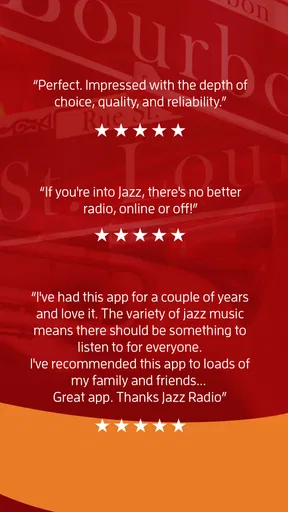
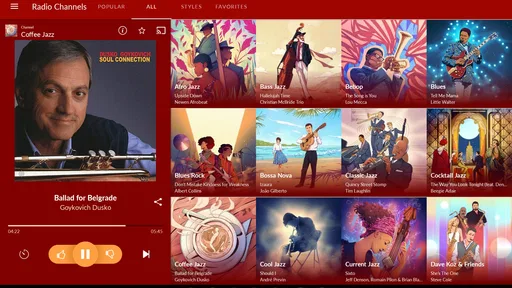
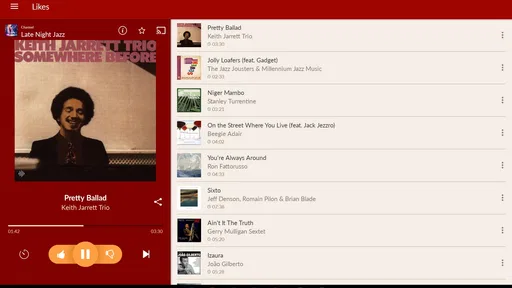
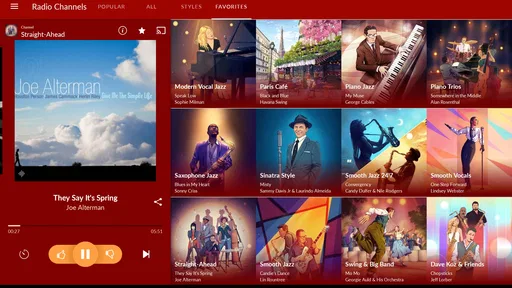
 Analysis by AppCompare
I like the idea behind Jazz Music Radio, but its appeal depends on what you want from a music app. It is built around listening to jazz stations rather than assembling a personal library, so it works best when I want music to accompany a task, a meal, or a quiet evening without choosing every track myself. That focused approach is its strongest point—and the main reason it will not suit everyone.
As a free music and audio app from Digitally Imported Inc, it has a 4.7 average from around 42,000 ratings and over 1 million installs. Those figures suggest a well-established audience, though popularity alone does not tell me whether its radio-first style fits your habits. The app is rated for Everyone, and the current version is 6.4.0.12510; it runs on Android 6.0 or later. Optional in-app purchases range from $4.75 to $89.99 per item, so I would check what each purchase offers before deciding whether it matters to you.
A focused alternative to building a playlist
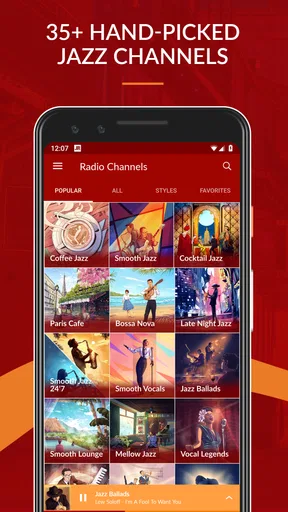
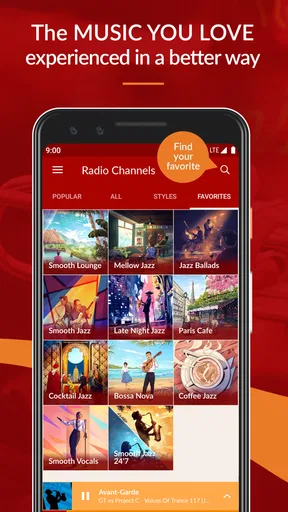
With more than 35 channels covering choices such as Smooth Jazz and Classic Jazz, the app gives me a quicker path to a mood than a broad music service usually does. Instead of searching for an album, choosing an artist, or refining a playlist, I can pick a station and let it carry the session. That is useful when I am cooking, reading, working through email, or having friends over and would rather not keep tending the music.
The trade-off is control. A station is not the same as selecting a specific record or lining up a run of favorite tracks, and a listener who wants precise playback may be happier with an on-demand service or a personal music library. I would treat this app as a convenient way to explore and keep jazz playing, not as a replacement for every kind of music listening.
How I would choose a station
My practical advice is to use the station descriptions as a starting point, then give a promising channel enough time to show its character. A name alone may not tell you whether the mix will fit a particular moment, while a brief description can help narrow the choice before you press play. When I want a familiar background, I would begin with a style I already enjoy; when I have room to explore, I would try a neighboring channel and see whether its feel works for me.
This makes the app especially approachable for someone who knows they like jazz but has not yet settled on one corner of it. It can also be useful for seasoned listeners who want a low-effort alternative to choosing albums. On the other hand, if you are looking for a specific artist, a particular recording, or a carefully ordered listening session, a station-based format may feel too hands-off.
Where the daily routine matters
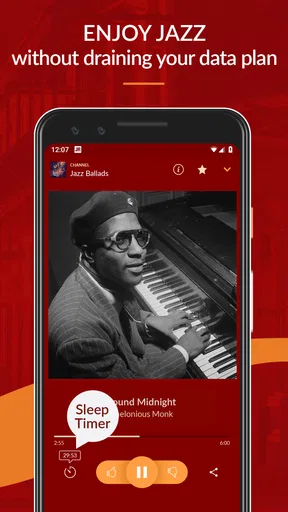
A realistic use for me would be starting a station while making breakfast, then letting the music continue as I get ready. The alarm-clock and sleep-timer features add a little routine-friendly flexibility: one can connect music with waking up, while the other suits winding down at night. I would still check the settings before relying on either feature for an important morning, since an alarm is only useful if it is configured the way you expect.
Worth Reading Before You Choose

Flipboard Shows What News Apps Must Do Beyond the Feed

Switching to Android Auto Means Rethinking Your Driving Routine

Google Calendar Makes a Crowded Week Easier to Manage

Ludo King Makes the Most of the Minutes Between Plans

Baby Panda World Brings Quick Play to Modern Phones, but Its Game Library Feels Busy

ESPN’s Live Game View Makes Following Close Games Easier
For work, I would use a steady station as a listening backdrop rather than switch channels whenever a track catches my attention. That small choice helps preserve the point of radio: fewer decisions and less interruption. If I were actively studying a musician or comparing recordings, though, I would move to an on-demand option that lets me revisit a particular track instead of leaving the selection to a channel.
What to expect from the free option
The app is free to install, but it also offers in-app purchases. That is worth keeping in mind if you are deciding whether to make it your regular listening tool: start with the available experience and only consider a purchase if its specific terms make sense for how you use the app. I would not assume that a paid option is necessary simply because it appears in the app, nor would I pay before checking what it changes.
Jazz Music Radio is also not the best fit when the listening environment demands a personal collection, exact track selection, or music across many genres. Its focus is a strength for a jazz mood, but it narrows the job it is designed to do. If you mainly want broad discovery across pop, rock, podcasts, and spoken audio, a general-purpose streaming app will probably be more practical.
The Tune-Filled World of Jazz Music Radio
First off, the app is all about, you guessed it, jazz! From the moment you open Jazz Music Radio, you're greeted with a sleek interface that screams "cool." It’s super easy to navigate, which is a big win for me because I like my music apps to be as chill as the music they play.
Variety That Hits All the Right Notes
One of the things I love about this app is the variety of stations it offers. Whether you're in the mood for some classic jazz standards or something a bit more avant-garde, they’ve got you covered. You can switch between stations with just a tap, and I found myself exploring styles I hadn’t even thought of before.
There’s an impressive list of artists featured on the app, from legends like Miles Davis and John Coltrane to contemporary artists who are pushing the boundaries of jazz today. It’s like having a jazz festival in your pocket!
Features That Enhance the Experience
Now, let’s talk features. The app comes with some cool functionalities that really enhance the listening experience. For starters, there’s a sleep timer, which is perfect if you like to drift off to some soothing saxophone solos. It also has an alarm clock feature, which is a jazzy way to wake up in the morning.
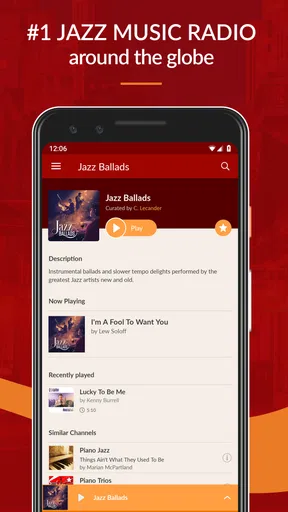
If you’re someone who loves to learn more about what you’re listening to, you’ll appreciate the detailed descriptions for each station. They give you a rundown of what to expect, which is great for discovering new music.
User Experience and Interface
Let’s talk about the user interface for a sec. It’s smooth, it’s sleek, and it’s intuitive. Everything is laid out in a way that makes sense, and I didn’t find myself getting lost trying to figure out where to find things. Plus, the app's aesthetic is on point with a dark theme that’s easy on the eyes.
The streaming quality is top-notch too. I didn’t experience any buffering issues, even while on the go, which is crucial for uninterrupted listening pleasure. Who wants their jazz interrupted by silence, right?
Community and Social Features
The app also has a neat social aspect. You can share your favorite stations with friends, and there’s a community vibe where you can see what others are tuning into. It’s like having a jazz club community right on your phone.
Plus, there are user reviews and ratings for each station, which I found super helpful when deciding what to listen to next. It’s always great to see what other jazz enthusiasts are grooving to.
Wrapping It Up
So, if you’re on the hunt for a music app that’s as cool as a cucumber and filled with nothing but pure jazz goodness, give it a shot. I’ve been loving the variety and the quality of the stations, and I think it’s a fantastic way to dive deep into the world of jazz.
Jazz Music Radio was released on March 10, 2011, and its version 6.4.0.12510 reflects a long-running app rather than a brand-new experiment. My verdict is positive for a particular listener: if you want jazz close at hand and enjoy letting stations guide the session, it is an easy app to recommend. If you need exact song control or a wider listening catalog, I would choose a different tool and keep this one in mind specifically for jazz-focused radio. Happy listening!
Pros
- Wide variety of jazz subgenres available.
- High-quality audio streaming support.
- User-friendly interface with easy navigation.
- Minimal ads for uninterrupted listening.
- Offline mode for premium users.
Cons
- Limited free version features.
- Occasional buffering on slower networks.
- No customization of playlists.
- Ads in the free version can be disruptive.
- Premium subscription slightly pricey.
FAQs for JAZZ MUSIC RADIO
What is Jazz Music Radio, and how does it work?
Jazz Music Radio is a streaming app that offers a wide selection of jazz music from various sub-genres and eras. Users can listen to curated playlists, explore stations dedicated to specific styles, and discover new artists. The app works by streaming music directly to your device, requiring an internet connection for full functionality.
Is Jazz Music Radio free to use, or does it require a subscription?
Jazz Music Radio offers both free and premium versions. The free version includes ads, while the premium subscription removes ads and may offer additional features like offline listening and exclusive content. Users can choose the option that best suits their needs and budget.
Can I create my own playlists on Jazz Music Radio?
Yes, Jazz Music Radio allows users to create their own playlists. You can add your favorite tracks, organize them by mood or theme, and even share them with friends. This feature enhances the personalized listening experience, making it easy to keep your favorite jazz tunes at your fingertips.
Does Jazz Music Radio offer offline listening?
Offline listening is available with a premium subscription to Jazz Music Radio. This feature allows you to download your favorite tracks and playlists to your device, so you can enjoy uninterrupted music even when you don't have an internet connection. It's perfect for travel or areas with limited connectivity.
What devices are compatible with Jazz Music Radio?
Jazz Music Radio is compatible with both Android and iOS devices. It can be downloaded from the Google Play Store or Apple App Store. Additionally, the app may offer compatibility with smart speakers and web browsers, making it accessible across various platforms for versatile listening.


